
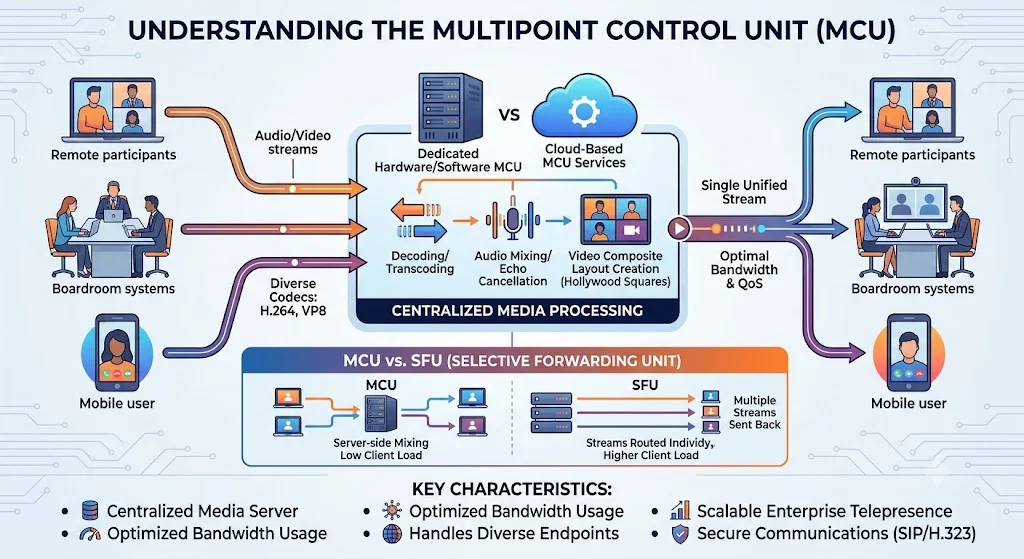
When a digital video call scales past two people, the hidden complexity of network engineering comes into plain view. In a basic two-way session, data moves in a straight line from one device to another. Introduce ten or twenty more people into that same virtual room, and the framework quickly buckles under the weight of exponential data streams. A multipoint control unit is a centralized hardware or software system that acts as an enterprise video conferencing bridge, ingesting media streams from all participants, combining them into a single stream, and routing that unified output back to every connected device.
By acting as a single, centralized point of management, it enables stable multi-endpoint conference connections across diverse locations.
The Core Mechanics: How an MCU Bridge Works
To understand why this architecture is so vital for modern telepresence setup requirements, we must look at what happens behind the screen. Without a centralized hub, every single user would have to send their own video and audio feed to every other attendee individually. If you are in a meeting with ten people, your computer has to upload its stream nine times and download nine separate incoming streams simultaneously. On a large scale, this approach triggers immense network infrastructure strain and creates unsustainable multipoint control unit bandwidth usage if left unmanaged.
A specialized multipoint control unit bypasses this issue by altering the flow of media traffic entirely. Instead of peer-to-peer clutter, every participant connects to the central bridge using standardized unified communications protocols. The server then carries out a continuous, multi-step media processing pipeline:
-
Ingestion: The central server continuously absorbs the unique incoming encrypted video and audio streams from every single endpoint.
-
Decoding: It temporarily breaks down and decompresses those incoming formats into raw, uncompressed files so they can be modified.
-
Mixing: It takes the individual visual feeds and cuts them into a unified grid, such as a traditional Hollywood Squares layout, creating a single composite image.
-
Egress: It compresses that brand-new single layout and broadcasts it back to everyone. Because of this, each endpoint only has to upload one stream and download one stream, keeping local processing demands incredibly low.
Server-Side Audio Mixing and Automated Echo Cancellation
Handling visual elements is only half the battle. Sound requires its own meticulous processing layer. An MCU bridge intercepts the audio feeds, actively isolates competing voices, and blends them into one clear sound. During this process, advanced server algorithms apply automated echo cancellation to prevent users from hearing their own voices bounce back to them. It filters out ambient room rumble, ensuring that the final output delivered to the meeting room solutions remains completely legible.
Dynamic Video Transcoding: Balancing Codecs
In a perfect world, every employee would use identical equipment with identical internet speeds. In reality, one executive might join from an immersive boardroom system using advanced H.265 video codecs, while a remote worker calls in from a mobile phone using WebRTC VP8 protocols. The multipoint control unit handles this mismatch through a process called transcoding. It translates varying data formats into compatible formats on the fly, ensuring that an older hardware MCU can still talk seamlessly to modern cloud setups without breaking the call.
MCU Architecture Deployment Models
Depending on your enterprise budget and existing physical hardware, this architecture can be integrated into your video conferencing network design in three distinct ways.
Embedded Mini-MCUs in Endpoints
Many high-end, modern physical video systems, like premium Yealink and Grandstream hardware, feature built-in mini systems directly inside the device. If you use an integrated endpoint to host a three-way or four-way call, the primary device itself acts as the session bridge. The machine intercepts external streams, mixes them locally, and distributes them out. While convenient for smaller team syncs, these embedded solutions are constrained by the physical limits of the device processor and cannot scale to large corporate town halls.
Dedicated On-Premise Servers
For large organizations that demand total ownership over their corporate media assets, deploying a dedicated multipoint control unit on an internal network is the gold standard. This can take the form of a specialized physical appliance or custom software installed on a Linux server. On-premise deployments provide flawless security controls and strict bandwidth management within local offices, making them highly popular in heavily regulated sectors like healthcare, government, and finance.
Modern Cloud-Based MCU Platforms
The third model shifts the heavy lifting entirely off your local hardware and relocates it to the cloud. Providers manage the underlying processing servers globally, allowing businesses to simply subscribe to the capacity they need. This utility model eliminates the need to buy expensive data center hardware while ensuring that massive meetings can scale instantly without crashing local internet pipelines.
Architectural Evolution: MCU vs. SFU vs. WebRTC Mesh
As web technology has evolved, alternative video routing systems have gained massive popularity. To build a future-proof communications stack, it is essential to look at the differences between the traditional multipoint control unit and its modern competitor, the Selective Forwarding Unit (SFU).
While an MCU decodes and mixes video into a single stream on the server, an SFU acts more like an intelligent traffic router. The SFU takes the raw video streams from each user and forwards them to all other participants without changing or mixing them.
This creates a stark trade-off. An SFU requires far less server processing power, making it incredibly cheap to operate at a massive scale. However, it shifts the bandwidth strain directly back to the end-user devices, which must download multiple individual video streams at once. Understanding this distinction is vital for optimal video conferencing network design, as large room setups often combine both technologies to keep performance stable across varying connection types.
Step-by-Step Multipoint Control Unit Setup & Configuration Guide
Setting up a corporate video environment requires careful preparation to avoid configuration errors. Use this structured roadmap to roll out your system systematically.
Phase 1: Network Assessment and Bandwidth Calculations
Before unboxing any physical hardware or launching a cloud server, check your network capacity. Calculate your maximum concurrent user traffic. If a single high-definition stream consumes 5 Mbps, a large multi-party call can quickly saturate an unoptimized circuit. Implement strict Quality of Service (QoS) rules on your office routers, prioritizing real-time video packets over standard web browsing traffic to prevent mid-call drops.
Phase 2: Interface Configuration and Credential Hardening
Once your server is active, access the administrative dashboard. The very first action must be updating all default manufacturer login credentials to block unauthorized network entry. Configure your signaling protocols, ensuring your SIP and H.323 communication paths are locked down behind your corporate firewall while allowing secure external connections for remote staff.
Phase 3: Performance Tuning and Stream Optimization
Run live tests under simulated heavy loads. Intentionally restrict the available connection speed on a few test devices to observe how the multipoint control unit responds. Fine-tune your video quality settings, adjusting maximum resolution thresholds and frame rates so the system gracefully lowers bitrates for struggling users without interrupting the meeting for everyone else.
Troubleshooting MCU Latency & Packet Loss Issues
Even with an optimal setup, real-world internet connections can fluctuate, causing noticeable lag or choppy visuals. When troubleshooting video issues, look at these three common areas:
-
High CPU Utilization on the Bridge: If video frames are freezing but audio remains clear, check your server performance metrics. The heavy transcoding of multiple video codecs can max out server processors. Resolving this requires upgrading your server hardware or capping the maximum number of concurrent high-definition connections.
-
Asynchronous Audio and Video: When mouth movements do not match the sound, it usually points to a timing mismatch during the server mixing stage. Updating your platform firmware or standardizing on a single preferred video codec across all corporate devices often resolves this tracking error.
-
Packet Drops Across the Firewall: Jerky, pixelated video blocks are a classic symptom of packet loss. Verify that your local network security switches are not mistakenly filtering out or slowing down real-time transport protocol streams.
Compliance, Security, and Data Privacy in MCU Infrastructures
Because a centralized multipoint control unit must completely decode and strip down video data streams in order to mix them, it becomes a high-value target for security monitoring. In highly regulated corporate spaces, maintaining data privacy requires strict adherence to international safety metrics.
Ensure that your media bridge fully supports secure transport protocols like SRTP for media encryption and TLS for signaling security. If your company operates under strict HIPAA or GDPR rules, choose an infrastructure setup that guarantees all uncompressed video segments are processed entirely in temporary system memory and never cached or written to a persistent disk drive. Restricting access to the administrative dashboard via multi-factor authentication ensures your virtual meeting spaces remain private, reliable, and secure.